06 September 2005

Can you micromanage yourself?

Here's a great article from 43 Folders: Harnessing your interstitial time, which could help you improve your time management skills. The article is about mining those unexpected moments when you unexpectedly have extra time on your hands (being on hold, for instance). The idea is that you can train yourself to use these moments more productively.

"The point is to get in the habit of challenging yourself to see what you can accomplish over very small, unscheduled periods of time. Like bird watching or shell collecting, these habits will improve with your ability to recognize this pattern quickly."

A few of the tips you'll find in this article:
- 1-2 minutes - Review your inbox, answer an email, or take out the trash
- 2-5 minutes - Return a fast phone call or draft a short email
- 5-10 minutes - Proof a draft report, finish your time sheets, or call to follow-up on a request you've made
- 10-30 minutes - Draft a new blog post or work report, research a client question on Google, or cull your Current Work file

43Folders is rapidly becoming one of my favorite spots for productivity tips. You might want to bookmark it.

Keep in touch! Sign up to get updates and occasional emails from me.

Will we ever replace paper?

We're getting close, but no technology has succeeded in replacing paper yet. The promise of a paperless, digital workplace is great, but as the emerging back-to-paper movement suggests, there still seems to be a long way to go.

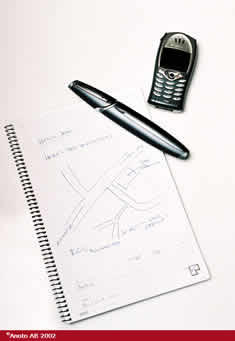
One of the things I have tried in the past is Anoto functionality, which combines pen and paper in a unique way. I first read about Anoto in the April 2001 issue of Wired magazine.

The story was about this hot new company that had invented a way for a pen to remember everything it wrote, and beam the information directly to a computer. It involved a tiny digital camera and hard disk in the pen, and a complex dot patterm, which was invisible to the naked eye and somehow never repeated itself exactly so the pen could always "know" where it was.

I didn't fully understand it, but I have been wanting something like this forever: a way that I could write on paper and synchronize the files with a computer or PDA, where they could be stored digitally.

The article was titled "The hot new medium: Paper", and at the time, I was convinced that it was an April fool's joke Wired was playing on all of us. I mean, the company was called "Anoto" and I was waiting for the "This was Anoto real story" joke.

Later that month though, a friend convinced me it was real and I looked up Anoto's website. Turns out it was a real company after all.

So I got online and bought the pen and some of the special paper. I had to buy it from a site in the UK because I couldn't find one in the States.

When I got the thing I tried it out and was amazed. It worked perfectly; better than I had anticipated. I could carry the pen around, write in the sketchbook any time I wanted, and when I got back to my laptop I could synchronize the drawings with my PC. I could even go back later and modify a drawing I had worked on two days earlier: the pen could always remember where I was.

I got a Nokia version of the pen, which was cool because I could use the same charger that I use with my phone. The pen synched with a "digital diary" on my computer. I could turn sketches into PowerPoint slides with the touch of a button.

I brought the digital pen and a digital sketchbook to an XPLANE training session and passed it around. Everyone took a turn.

I was very happy with the whole system but for some reason it didn't become a part of my daily routine. Why? I'm not sure exactly, but if I had to put my finger on it I would say it was the complexity of the entire system:
- You had to have special paper, and remember to bring it with you
- You had to have a special pen, and it was battery powered so there was always the potential for it to run out of juice
- Since it didn't fully replace my PC, it didn't actually lighten my burden when traveling
- In fact it increased my load, because I had to carry the PC, the pen, the special paper and the docking bay.

Now I'm moving on to my next great hope: the tablet PC. It's not quite the ultimate tool yet, but it's starting to get close.

If you want to try the digital pen/paper scenario, you can get everything you need at Datamind, the UK company where I got mine. As far as I know, they will ship it to you just about anywhere.

If you don't mind managing a number of moving parts it's a great system.

If you have had an experience with Anoto functionality -- positive or negative -- please leave a comment. I would love to hear about your experience.

Keep in touch! Sign up to get updates and occasional emails from me.

05 September 2005

Notepaper generator

Here's an interesting tool for back-to-paper evangelists called a notepaper generator. It was designed by Simson L. Garfinkel, and it allows you to generate personal notepaper over the web.

In case you lose your notes, you can set it up so every page has your preferred contact info.

You can also download the source code under a Creative Commons license.

Thanks to Arlen Britton for this link.

Keep in touch! Sign up to get updates and occasional emails from me.

04 September 2005

Can you keep your entire life in a text file?

One man is trying to live his life in a text file: "As Danny O'Brien discovered during his research into effective organizational habits of geeks, text is the simplest, most platform-independent, fastest-to-search format we have for storing information."

Keep in touch! Sign up to get updates and occasional emails from me.

Pencil revolution

In all this talk about paper I fear I have neglected a key player: Pencil revolution.

Keep in touch! Sign up to get updates and occasional emails from me.

03 September 2005

The best technology ever invented

Paper, yes paper, is still the best, least expensive, most long-lived and most reliable technology:

- It doesn't need to be upgraded. Paper has not significantly changed for thousands of years. A hundred-year-old piece of paper is still usable -- readable and writable -- today.

- It does not need electricity or any other power source to function.

- It does not crash. Unless you spill something on it, or take the effort to light it on fire, you will not lose your work.

- Industry standards are open and widely accepted. Paper comes in standard formats for standard purposes: Letter-size, tabloid-size, index cards, business cards, etc. These standard sizes fit standard devices such as printers, fax machines, etc.

- It is ligher in weight and more transportable than any other technology.

- It's inexpensive. The entry-level price point is just a few cents. Usually it can be found for free.

- It's easily learned and used. Just about anyone in the world can be up and running in minutes, even a small child.

The back-to-paper movement is in full swing. You can find an eloquent manifesto on the subject by Douglas Johnston at A Million Monkeys Typing. It's titled well: "The Lost Art."

The much-maligned, all-too-often taken for granted staple of everyday communication, paper, is coming back. The back-to-paper movement is growing.

Viva the revolution!!!

Keep in touch! Sign up to get updates and occasional emails from me.

Get more productive with your email

If you want to improve your productivity, there is proably no better place to begin than to focus on that hungry "information monster" that devours way too much of your attention every day: your email. Check out entropic principal: Using Thunderbird to Get Things Done, for some interesting ideas about how to categorize your email and tasks:

"I've assigned my labels as follows: Delete, Archive, Action Required, Wait, Defer."

Keep in touch! Sign up to get updates and occasional emails from me.

The back-to-paper movement

The back-to-paper movement is gaining momentum. Take a look at the D*I*Y Planner: Paper, productivity & passion: "We are a community of people who see the value of paper as a medium for planning, productivity, creative expression, and exploring ideas. "

You heard it here first.

Keep in touch! Sign up to get updates and occasional emails from me.

Saturday night fights

The weekends are a time to relax and get away from it all – and what better way to relax than to watch a good fight!

I have two Saturday night fight options for you this week:

If you’re a dev geek you have got to check out the Sumobot competition from the Windows Embedded Devcon, emceed by none other than Windows Embedded guru Mike Hall.

If you’re more of a comics geek you need to check out the Kami-Robo fight between The Ole (pictured here) and Thunder Tiger.

Of course if you’re both a dev geek and a comics geek, you will need to check out both fights, in which case you might get hungry. If you do, you might want to have a sandwich, courtesy of Bill Keaggy.

Let me know if you’d like to see Saturday night fights become a recurring tradition in this blog.

Keep in touch! Sign up to get updates and occasional emails from me.

The ultimate PDA

I'm not a PDA guy because I haven't found the ultimate PDA yet. To me, the ultimate PDA is as thin and light as a piece of paper. It can fit into my back pocket. It's disposable and fully recyclable. It requires no electricity. And oh yeah, it's free.

Guess what: I've found it. It's the Pocketmod, a new way, low-tech way to keep yourself organized.

The Pocketmod is made out of paper, still one of the best and most long-lived technologies ever invented.

Pocketmod offers a number of "mods" that allow you to customize your Pocketmod to suit your needs. I've set mine up for monthly use, with a to-do list, four weekly calendars, a monthly calendar to capture dates for the next month, and a yearly calendar as well just in case.

For those with a need for a PDA that will hold a little more information, you might want to try the Hipster PDA, which can hold significantly more data.

The Hipster PDA uses index cards and clips. There's a whole user community out there, and even a major wiki entry to get you started. If you're willing to put in a little energy, you can even synch between your paper and digital PDA.

Dare I say there's a major "back to paper" movement underway? And just when I finally broke down and got a tablet pc. What was I thinking?

Keep in touch! Sign up to get updates and occasional emails from me.

02 September 2005

Why you should leave comments on my blog


I love to get your comments on my blog: it's highly valuable feedback that can help me continue to make it more useful and relevant to you. If that isn't reason enough, here's another reason for leaving thoughtful comments on any blog you visit: It could make you famous!

"Comment added to blog leads to inclusion in the Wall Street Journal" from The Intuitive Life Business Blog: "In less than six days I am quoted in a national newspaper because I've gotten involved with the discussion happening in the blogosphere."

Many thanks to my friend Richard Black, Technology Strategist.

Keep in touch! Sign up to get updates and occasional emails from me.

Visual thinking: How culture influences perception

XPLANE is known as the visual thinking company. Sometimes people ask me what we mean by visual thinking. One answer is that seeing and thinking are difficult to separate: The mind works with the eyes in mysterious ways to interpret the world. Here's good example of how that works: a recent study about how your cultural background may influence the way you see the world.

Wired News: In Asia, the Eyes Have It: "Kyle R. Cave of the University of Massachusetts at Amherst commented: 'These results are particularly striking because they show that these cultural differences extend to low level perceptual processes such as how we control our eyes. They suggest that the way that we see and explore the world literally depends on where we come from.'"

Keep in touch! Sign up to get updates and occasional emails from me.

01 September 2005

When a chart is not enough

Visuals are a great way to get a large volume of information across in a very short period of time. Our eyes are directly connected to our brain, and we process visual information far more rapidly and effectively than any other kind.

Charts and graphs are powerful tools to make information more visual and engaging. But when you are describing something really new or different, charts and graphs may not be enough.

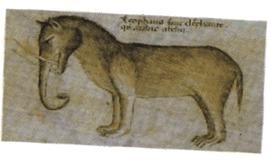
For example, when early explorers returned from distant lands, they had to describe all sorts of strange and unusual creatures; things people had never seen before. On occasion they would describe them to artists who would attempt to depict them visually. Here are a couple of examples:


In this case the pictures depict elephants, and they were created purely from verbal descriptions. You can see from these pictures that even talented visual artists can have trouble visualizing something really new or different, something they had never seen before.

Now, imagine you were an explorer, and that you needed to explain what an elephant was using charts and graphs. It might look something like this (Click to enlarge picture):

How the elephant differs from other animals


Do you think the chart is getting the real point across?

Today’s world is changing at a breakneck pace. Often the things we are challenged with communicating are complex, new and different – we are often trying to explain things that are really new or different; things they have never seen before.

And still we attempt to convey these ideas using charts and graphs. Charts and graphs are a wonderful way to visualize complexity; they are powerful tools for depicting rich sets of data; but there are times – and they come more and more often these days – when a chart is not enough.

Remember: when you have something really new or different to convey; something people have never seen before – draw them a picture. Your audience will thank you for it.

Keep in touch! Sign up to get updates and occasional emails from me.

How to know when someone is lying to you

Interesting post, courtesy of digg: How to detect lies - body language, reactions, speech patterns

Keep in touch! Sign up to get updates and occasional emails from me.

How much information is too much?

When you are presenting information, how do you determine what to leave in and what to leave out? It can be difficult, especially if what you want to communicate is complex or potentially confusing.

As you think through your presentation, turn the situation around in your head. Think about the person you are presenting to and try to imagine the meeting from their perspective: Where does the meeting fall on their priority list? Think about the other things on their plate. If you were that person, how much time would you want to devote to this issue? How much energy or attention would you be willing to commit to understanding?

The amount of information you include should be in direct proportion to the amount of time and attention you expect from your audience. Someone who is highly interested in the subject matter – a technical reader, for example – will enjoy deep and textured content, with many layers and shades of meaning. One who is less interested, for example, a sales prospect, will prefer a brief, simple picture or description that he can understand as quickly as possible.

Know in advance how much time your reader is willing to invest, and design your presentation accordingly. When in doubt, leave it out.

Nobody will ever complain that your presentation was too short.

Keep in touch! Sign up to get updates and occasional emails from me.